
When Your AI Screws Up, Who Owns It?
Oct 19th, 2026When AI makes a mistake, who's responsible? Learn about AI accountability, business risks and how NZ companies can use AI responsibly.
Read More
You Asked
We Answer
Google Search Console is Google’s free platform for understanding how your website appears in Google Search. It shows which search queries generate impressions and clicks, which pages appear in results, and where technical or indexing issues may affect visibility.
The important part is what you do with the data. Search Console can help you find keywords that already generate impressions, pages that need better content or titles, and indexing issues that can prevent important URLs from appearing properly. For SEO, it is one of the most useful sources of first party search data available to a website owner.
But here’s the issue: Most businesses have it set up… without ever really using it.
Google Search Console is a free Google tool that shows how your website performs in organic search. It helps you understand when your pages appear, which search queries trigger them, how often people click, and which pages are receiving visibility.
How does Google Search Console work? Google collects search performance and indexing information about your website and makes that data available through a set of reports. You can use those reports to see search queries, pages, impressions, clicks, click through rate, average position, indexing status, and other search related signals.
Unlike Google Analytics, which focuses mainly on what happens after someone reaches your website, Search Console helps you understand what happens before the click. That makes it particularly useful when you are working on SEO, content, and technical visibility.
The main Google Search Console performance report focuses on four core metrics: impressions, clicks, click-through rate, and average position. Together, they show how visible your pages are, how often people visit from search, and where your search snippets or rankings may need improvement.
You can also break the data down by search query, page, country, and other dimensions. This makes it possible to identify pages that already have search visibility but are not generating many clicks, as well as queries where a small improvement could unlock more traffic.
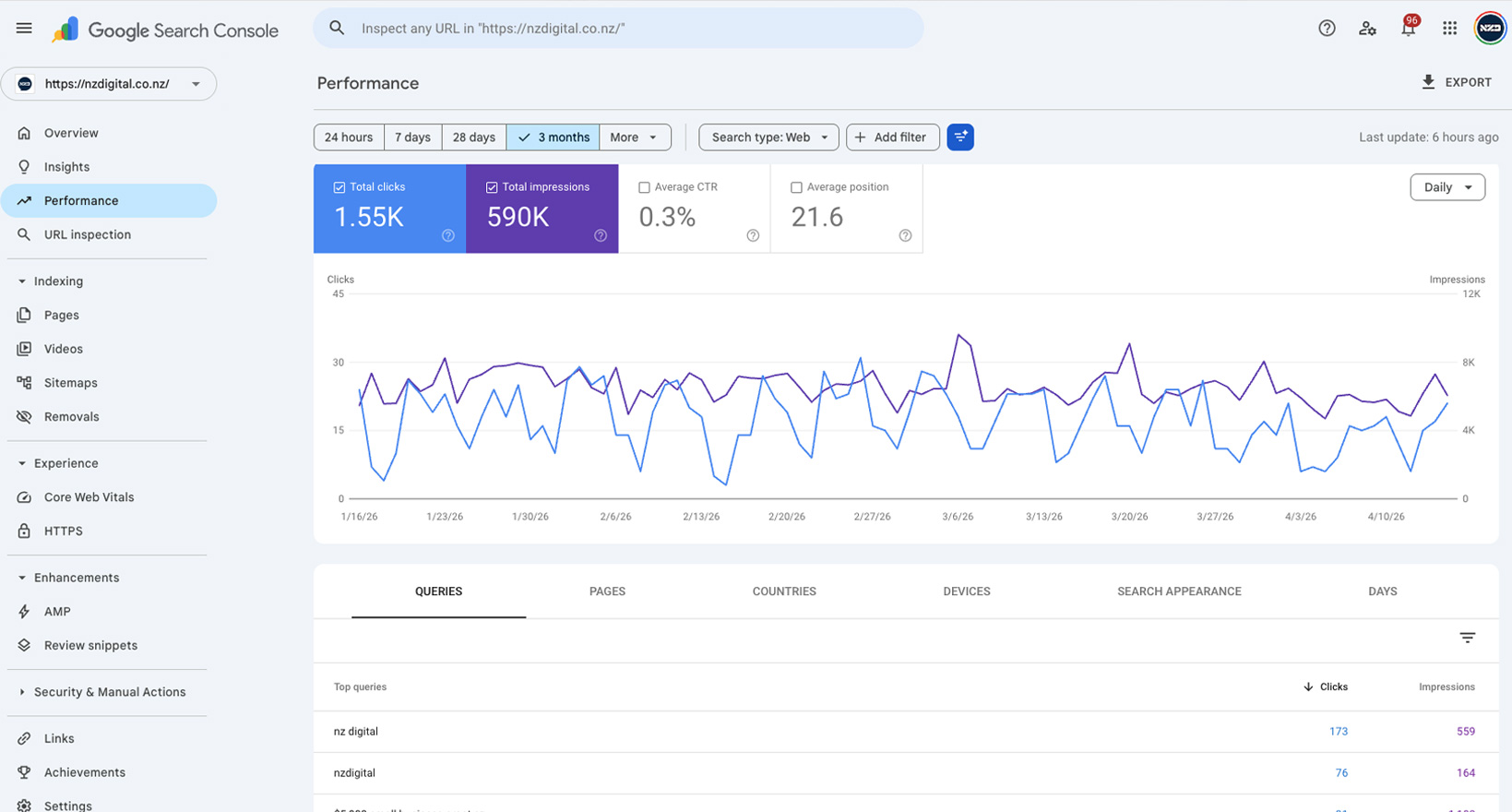
Google Search Console matters for SEO because it shows what is actually happening in Google rather than what you assume is happening. You can identify the queries your pages already appear for, the URLs receiving impressions, and the areas where visibility is growing or falling.
It is also useful for finding optimisation opportunities. A page that has strong impressions but a low click-through rate may need a clearer title or description. A page sitting just outside page one may benefit from stronger content, better internal linking, or improved search intent alignment. This means Search Console can guide both content optimisation and technical SEO work.
The most common mistake is setting up Google Search Console and then never checking it. The data is there, but it is not being used to inform decisions or improve performance.
Another issue is focusing only on rankings without considering click-through rate or search intent. A page ranking well but not getting clicks is a missed opportunity.
Many businesses also ignore technical warnings or indexing issues, which can quietly reduce visibility over time. Without regular review, these problems can go unnoticed and impact overall performance.
To use Google Search Console for SEO, start with the Performance report. Review the queries and pages generating the most impressions, then look for URLs with good visibility but fewer clicks than you would expect.
Next, inspect pages that are close to page one. These can often become quick wins through stronger headings, more useful copy, better internal links, or clearer alignment with the search intent behind the query.
Finally, review indexing and technical reports regularly. The aim is not to stare at rankings every day. It is to use Search Console data to decide which pages need attention, what content should be improved, and where technical issues may be limiting organic visibility.
What is the purpose of Google Search Console?
Its main purpose is to show how your website appears in Google Search and provide data about queries, pages, impressions, clicks, click through rate, average position, and indexing.
How does Google Search Console help SEO?
It helps you find search opportunities, diagnose indexing problems, identify pages with strong impressions but weak clicks, and decide where on page optimisation could improve visibility.
Is Google Search Console the same as Google Analytics?
No. Search Console focuses on visibility and performance in Google Search, while Google Analytics focuses mainly on what users do after they reach your website.
NZ Digital are a Auckland based digital marketing agency, we offer a wide range of done for you digital marketing and lead generation services. If you have more questions or would like to book a FREE Digital Marketing consult please schedule a call with us.

When AI makes a mistake, who's responsible? Learn about AI accountability, business risks and how NZ companies can use AI responsibly.
Read More
SEO is one of the most important long-term investments in digital marketing, but choosing the right agency can be difficult when so many promise the same results. The difference often comes down to transparency, strategy and the questions you ask before signing.
Read More
Performance Max gives businesses a way to reach customers across Google’s entire advertising network from one campaign, but its success depends heavily on strong tracking, enough conversion data and clear commercial goals.
Read More


